
01 / 06
A rebuilt interface
The Grand Update replaces the old window with a full workspace: a project file tree, tabbed editor, Build and Execute, a problems list and an output terminal that shows which clients are attached.
 Wave
Roblox Executor · Lifetime license · Windows 10 and 11
The rebuilt Wave with Wave AI, built-in Dex and source control. One payment, every update, no weekly keys.
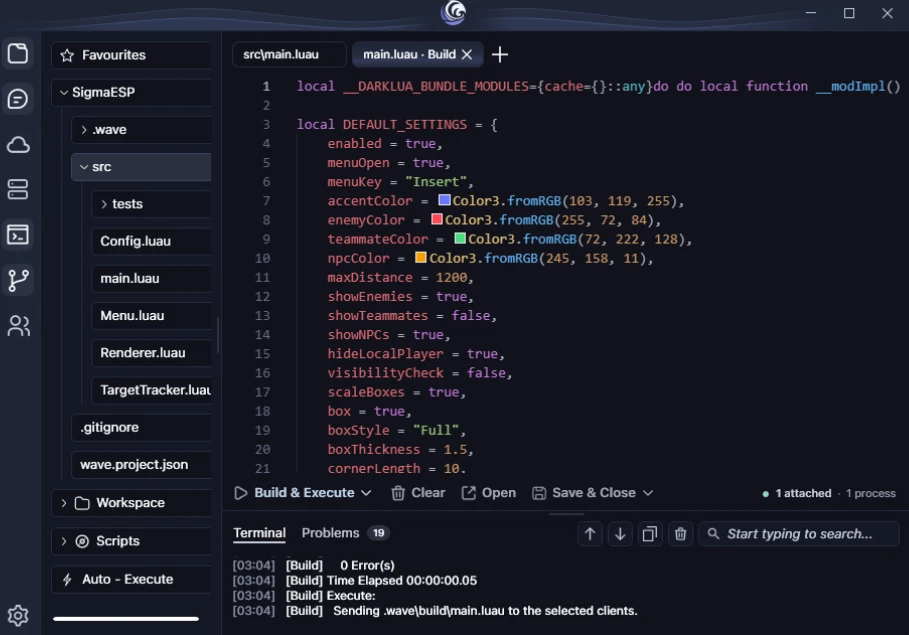
Wave is a paid Roblox script executor for Windows, made by the Wave team at getwave.gg. Since the Grand Update it is sold as a one-time lifetime license, Wave Standard, for $19.99. It runs Luau scripts inside Roblox and includes Wave AI, a built-in Dex explorer, source control and a decompiler.
BuyWave sells Wave lifetime keys through BuyKeys, an authorized Wave reseller. Keys are delivered instantly.
| Type | Roblox script executor |
|---|---|
| Developer | The Wave team (getwave.gg) |
| License | Wave Standard, lifetime |
| Price | $19.99 one payment |
| Platform | Windows 10 and 11, 64-bit. Android, iOS and macOS planned |
| Script support | 100% sUNC, 99% UNC (WEAO) |
| Status | Working, version NEW-1.6.3 |
| Key features | Wave AI, built-in Dex, source control, decompiler, multi-client |
| Delivery | Instant, on screen and by email |
This is the Grand Update interface. Open files in the tree, run Build & Execute, ask Wave AI something or commit a change.
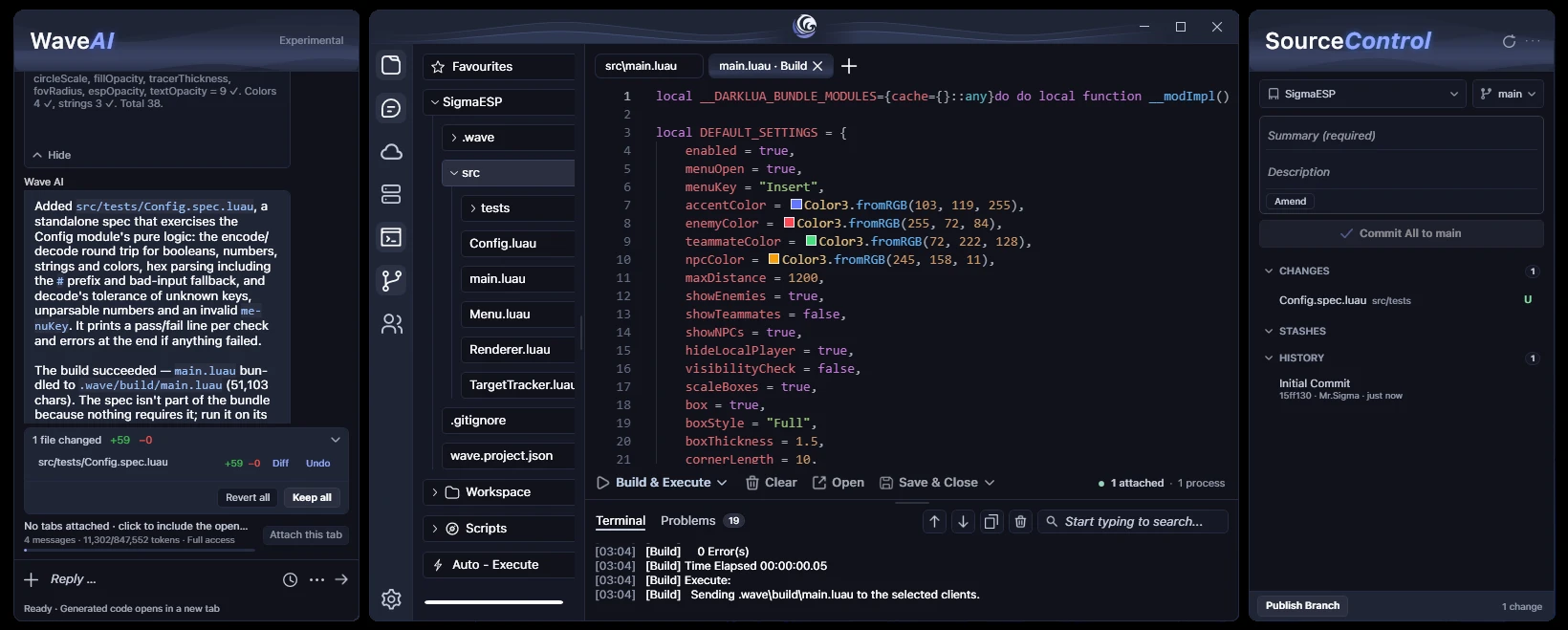
The Grand Update replaces the old window with a full workspace: a project file tree, tabbed editor, Build and Execute, a problems list and an output terminal that shows which clients are attached.
Wave AI reads the tab you attach, writes or reworks the code and shows the change as a diff you can keep or revert. It can browse the game tree to find what a script needs before it writes it.
Game Explorer lists every instance in the running game with search, filters and a properties panel for appearance, data and attributes. No more loading a Dex script every session.
Track changes to your scripts, write a commit summary, stash work in progress and switch branches. History shows who changed what and when, so a broken edit is one click from undone.
Decompile supported scripts, inspect bytecode and get output you can read and debug. Useful for learning how a game works and for fixing scripts that stopped working.
Sign in once and manage your license from the customer dashboard. Wave plans to use the same account for its Android, iOS and macOS versions when they launch.
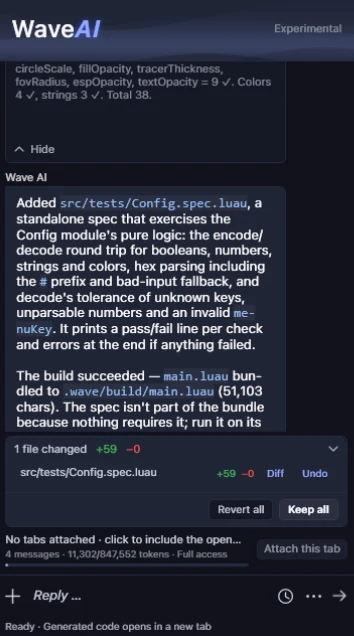
Ask for a script or a fix. It reads your project, edits the right file and shows the change with Keep all or Revert all.
Wave AI guide →Project tree, tabs, Build & Execute to every attached client, a problems list and a terminal with build output.
All features →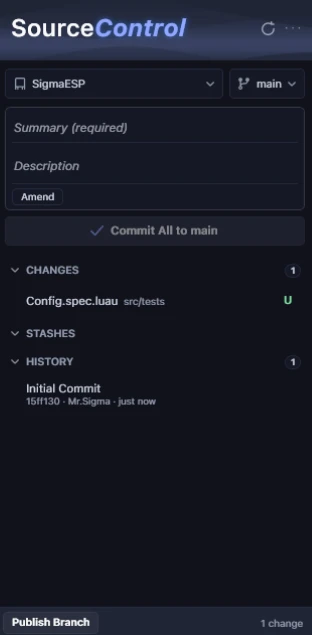
Commit, stash and branch your scripts. Roll back any edit that broke something.
Source control guide →Wave used to cost $4.99 a week. Slide to see what lifetime saves you.
Lifetime is cheaper from week 5. After that, every week is free.
BuyWave is run by BuyKeys. When you buy, you check out on buykeys.gg with Wave already in your cart.
Add any of these in the same BuyKeys cart. One checkout, one email.
Live data from WEAO, checked when you load the page.
Click buy and Wave lifetime is already in your BuyKeys cart. Pay by card or crypto.
Your key shows on the order page and lands in your inbox. It also stays in your BuyKeys dashboard.
Get Wave from the official site, redeem your key on your Wave account and join a game. Install guide.
Download Wave from getwave.gg, install the runtimes it needs, create your Wave account and attach to Roblox for the first time.
Where your key shows up after you pay, how to add it in Wave's license panel and what to do if Wave says Invalid Key.
Fixes for Wave stuck on Initializing, Invalid Key, Mismatch Version, Internal Error, errors 1008, 1010, 1001 and 1080, and Roblox crashes.
Wave showing Invalid Key after you paste a working key? Fix it with a VPN, a DNS flush, a clock sync and a clean Wave data folder.
The Windows version, .NET and Visual C++ runtimes Wave needs, which one fixes most errors, and the optional bootstrappers and VPNs.
An honest look at Wave's safety: where the real risks come from, what WEAO's detection flag means and how to protect your account.
Yes. BuyWave is run by BuyKeys, an authorized Wave reseller listed on getwave.gg/resellers. Every key comes from Wave's reseller system.
$19.99 once. There are no renewals or weekly payments.
BuyWave is run by BuyKeys, the authorized Wave reseller. Checkout runs on buykeys.gg so your order, key and support live in one BuyKeys account. Orders of $10 or more also unlock 14 days of free daily spins there.
Right after payment clears. Your key shows on the order page and is emailed to you. Card payments usually clear in seconds, crypto waits for one network confirmation.
Only from the official site, getwave.gg. We never host the client. Any other download link is a risk.
Not yet. Wave runs on Windows 10 and 11. Android, iOS and macOS versions are planned and will use the same Wave account.
No executor is risk free. Using one breaks Roblox's terms and any account can be banned. Read our safety guide and use an alt account.
Checkout on BuyKeys. Your key lands in your inbox seconds after you pay.